Munir Hamad
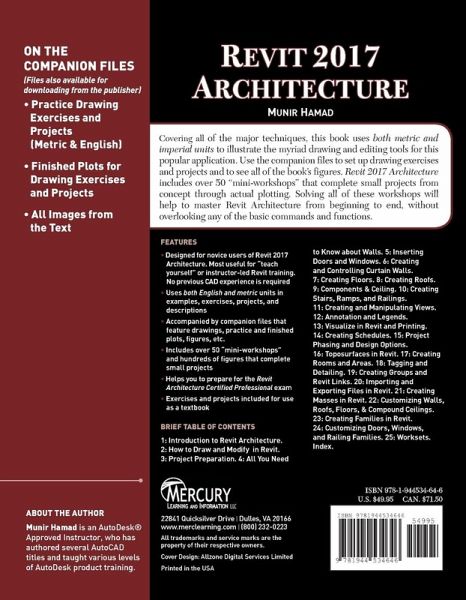
Revit 2017 Architecture
Munir Hamad
Revit 2017 Architecture
- Broschiertes Buch
- Merkliste
- Auf die Merkliste
- Bewerten Bewerten
- Teilen
- Produkt teilen
- Produkterinnerung
- Produkterinnerung
No detailed description available for "Revit 2017 Architecture".
Andere Kunden interessierten sich auch für
Rajat NainwalFeasibility Study of Energy Conservation Building Code 2017 for Hotels45,99 €
Douglas R. SeidlerRevit Architecture 2018 for Designers93,99 €
Paul F AubinThe Aubin Academy Revit Architecture48,99 €
Christine Nickl-WellerHealing Architecture 2004-201739,90 €
Best of Austria Architektur 2016_1758,00 €
Max HolandaConferenza tra i software di rappresentazione dei progetti architettonici23,99 €
Max HollandKonferenciq mezhdu programmnym obespecheniem dlq predstawleniq arhitekturnyh proektow23,99 €-
-
-
Produktdetails
- Produktdetails
- Verlag: De Gruyter
- 1. Auflage
- Seitenzahl: 572
- Erscheinungstermin: 3. Februar 2017
- Englisch
- Abmessung: 229mm x 178mm x 31mm
- Gewicht: 916g
- ISBN-13: 9781944534646
- ISBN-10: 1944534644
- Artikelnr.: 44946691
- Herstellerkennzeichnung
- Walter de Gruyter
- Genthiner Straße 13
- 10785 Berlin
- productsafety@degruyterbrill.com
- Verlag: De Gruyter
- 1. Auflage
- Seitenzahl: 572
- Erscheinungstermin: 3. Februar 2017
- Englisch
- Abmessung: 229mm x 178mm x 31mm
- Gewicht: 916g
- ISBN-13: 9781944534646
- ISBN-10: 1944534644
- Artikelnr.: 44946691
- Herstellerkennzeichnung
- Walter de Gruyter
- Genthiner Straße 13
- 10785 Berlin
- productsafety@degruyterbrill.com
Hamad Munir: Munir Hamad is an Autodesk(R) Approved Instructor and certified Autodesk AutoCAD Master, who has authored several AutoCAD titles and taught various levels of AutoCAD training.
1: Introduction to Revit Architecture.
2: How to Draw and Modify in Revit.
3: Project Preparation.
4: All You Need to Know about Walls.
5: Inserting Doors and Windows.
6: Creating and Controlling Curtain Walls.
7: Creating Floors.
8: Creating Roofs.
9: Components & Ceiling.
10: Creating Stairs, Ramps, and Railings.
11: Creating and Manipulating Views.
12: Annotation and Legends.
13: Visualize in Revit and Printing.
14: Creating Schedules.
15: Project Phasing and Design Options.
16: Toposurfaces in Revit.
17: Creating Rooms and Areas.
18: Tagging and Detailing.
19: Creating Groups and Revit Links.
20: Importing and Exporting Files in Revit.
21: Creating Masses in Revit.
22: Customizing Walls, Roofs, Floors, & Compound Ceilings.
23: Creating Families in Revit.
24: Customizing Doors, Windows, and Railing Families.
25: Worksets.
Index.
2: How to Draw and Modify in Revit.
3: Project Preparation.
4: All You Need to Know about Walls.
5: Inserting Doors and Windows.
6: Creating and Controlling Curtain Walls.
7: Creating Floors.
8: Creating Roofs.
9: Components & Ceiling.
10: Creating Stairs, Ramps, and Railings.
11: Creating and Manipulating Views.
12: Annotation and Legends.
13: Visualize in Revit and Printing.
14: Creating Schedules.
15: Project Phasing and Design Options.
16: Toposurfaces in Revit.
17: Creating Rooms and Areas.
18: Tagging and Detailing.
19: Creating Groups and Revit Links.
20: Importing and Exporting Files in Revit.
21: Creating Masses in Revit.
22: Customizing Walls, Roofs, Floors, & Compound Ceilings.
23: Creating Families in Revit.
24: Customizing Doors, Windows, and Railing Families.
25: Worksets.
Index.
1: Introduction to Revit Architecture.
2: How to Draw and Modify in Revit.
3: Project Preparation.
4: All You Need to Know about Walls.
5: Inserting Doors and Windows.
6: Creating and Controlling Curtain Walls.
7: Creating Floors.
8: Creating Roofs.
9: Components & Ceiling.
10: Creating Stairs, Ramps, and Railings.
11: Creating and Manipulating Views.
12: Annotation and Legends.
13: Visualize in Revit and Printing.
14: Creating Schedules.
15: Project Phasing and Design Options.
16: Toposurfaces in Revit.
17: Creating Rooms and Areas.
18: Tagging and Detailing.
19: Creating Groups and Revit Links.
20: Importing and Exporting Files in Revit.
21: Creating Masses in Revit.
22: Customizing Walls, Roofs, Floors, & Compound Ceilings.
23: Creating Families in Revit.
24: Customizing Doors, Windows, and Railing Families.
25: Worksets.
Index.
2: How to Draw and Modify in Revit.
3: Project Preparation.
4: All You Need to Know about Walls.
5: Inserting Doors and Windows.
6: Creating and Controlling Curtain Walls.
7: Creating Floors.
8: Creating Roofs.
9: Components & Ceiling.
10: Creating Stairs, Ramps, and Railings.
11: Creating and Manipulating Views.
12: Annotation and Legends.
13: Visualize in Revit and Printing.
14: Creating Schedules.
15: Project Phasing and Design Options.
16: Toposurfaces in Revit.
17: Creating Rooms and Areas.
18: Tagging and Detailing.
19: Creating Groups and Revit Links.
20: Importing and Exporting Files in Revit.
21: Creating Masses in Revit.
22: Customizing Walls, Roofs, Floors, & Compound Ceilings.
23: Creating Families in Revit.
24: Customizing Doors, Windows, and Railing Families.
25: Worksets.
Index.