- Broschiertes Buch
- Merkliste
- Auf die Merkliste
- Bewerten Bewerten
- Teilen
- Produkt teilen
- Produkterinnerung
- Produkterinnerung
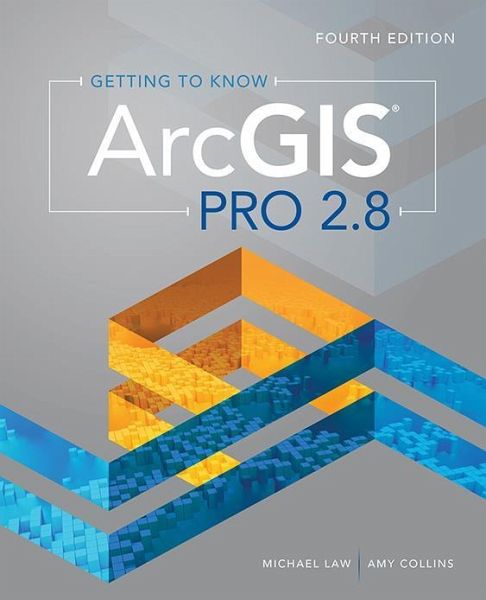
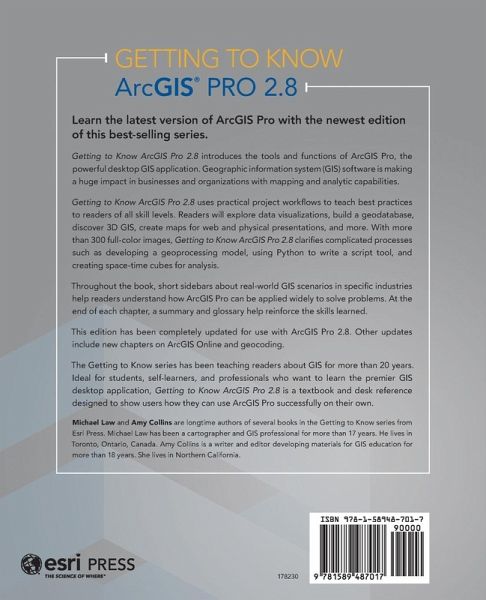
Getting to Know ArcGIS Pro 2.8Â is a textbook and desk reference designed to show users how they can use ArcGIS Pro successfully on their own.
Andere Kunden interessierten sich auch für
Dave CrawfordESRI Advanced Guide to Python in ArcGIS77,99 €
Michael LawGetting to Know ArcGIS Pro 3.2102,99 €
Maribeth H. PriceSwitching to ArcGIS Pro from Arcmap68,99 €
Thomas CoughlinTop 20 Essential Skills for ArcGIS Experience Builder78,99 €
Melissa L. MayoTop 20 Essential Skills for ArcGIS Utility Network43,99 €
Bonnie ShrewsburyTop 20 Essential Skills for ArcGIS Pro44,99 €
Wilpen L. GorrGIS Tutorial for ArcGIS Pro 3.1102,99 €-
-
-
Getting to Know ArcGIS Pro 2.8Â is a textbook and desk reference designed to show users how they can use ArcGIS Pro successfully on their own.
Produktdetails
- Produktdetails
- Verlag: ESRI Press
- Fourth Edition
- Seitenzahl: 420
- Erscheinungstermin: 10. Februar 2022
- Englisch
- Abmessung: 233mm x 189mm x 26mm
- Gewicht: 1052g
- ISBN-13: 9781589487017
- ISBN-10: 158948701X
- Artikelnr.: 62229099
- Herstellerkennzeichnung
- Libri GmbH
- Europaallee 1
- 36244 Bad Hersfeld
- gpsr@libri.de
- Verlag: ESRI Press
- Fourth Edition
- Seitenzahl: 420
- Erscheinungstermin: 10. Februar 2022
- Englisch
- Abmessung: 233mm x 189mm x 26mm
- Gewicht: 1052g
- ISBN-13: 9781589487017
- ISBN-10: 158948701X
- Artikelnr.: 62229099
- Herstellerkennzeichnung
- Libri GmbH
- Europaallee 1
- 36244 Bad Hersfeld
- gpsr@libri.de
Michael Law is a cartographer and GIS professional with over sixteen years of experience. He and Amy Collins previously updated Getting to Know ArcGIS Desktop 10.8.
Contents
Preface
Chapter 1 Introducing GIS
Exercise 1a: Explore ArcGIS Online
Chapter 2 A first look at ArcGIS Pro
Exercise 2a: Learn some basics
Exercise 2b: Go beyond the basics
Exercise 2c: Experience 3D GIS
Chapter 3 Exploring geospatial relationships
Exercise 3a: Extract part of a dataset
Exercise 3b: Incorporate tabular data
Exercise 3c: Calculate data statistics
Exercise 3d: Connect spatial datasets
Chapter 4 Creating and editing spatial data
Exercise 4a: Build a geodatabase
Exercise 4b: Create features
Exercise 4c: Modify features
Chapter 5 Facilitating workflows
Exercise 5a: Manage a repeatable workflow
using tasks
Exercise 5b: Create a geoprocessing model
Exercise 5c: Run a Python command and
script tool
Chapter 6 Collaborative mapping
Exercise 6a: Prepare a database for data
collection
Exercise 6b: Prepare a map for data
collection
Exercise 6c: Collect data using ArcGIS
Collector
Chapter 7 Geoenabling your project
Exercise 7a: Prepare project data
Exercise 7b: Geocode location data
Exercise 7c: Use geoprocessing tools to
analyze vector data
Chapter 8 Analyzing spatial and temporal patterns
Exercise 8a: Create a kernel density map
Exercise 8b: Perform a hot spot analysis
Exercise 8c: Explore the results in 3D
Exercise 8d: Animate the data
Chapter 9 Determining suitability
Exercise 9a: Prepare project data
Exercise 9b: Derive new surfaces
Exercise 9c: Create a weighted suitability
model
Chapter 10 Presenting your project
Exercise 10a: Apply detailed symbology
Exercise 10b: Label features
Exercise 10c: Create a page layout
Exercise 10d: Share your project
Appendix Image and data source credits
Data license agreement
Glossary
Preface
Chapter 1 Introducing GIS
Exercise 1a: Explore ArcGIS Online
Chapter 2 A first look at ArcGIS Pro
Exercise 2a: Learn some basics
Exercise 2b: Go beyond the basics
Exercise 2c: Experience 3D GIS
Chapter 3 Exploring geospatial relationships
Exercise 3a: Extract part of a dataset
Exercise 3b: Incorporate tabular data
Exercise 3c: Calculate data statistics
Exercise 3d: Connect spatial datasets
Chapter 4 Creating and editing spatial data
Exercise 4a: Build a geodatabase
Exercise 4b: Create features
Exercise 4c: Modify features
Chapter 5 Facilitating workflows
Exercise 5a: Manage a repeatable workflow
using tasks
Exercise 5b: Create a geoprocessing model
Exercise 5c: Run a Python command and
script tool
Chapter 6 Collaborative mapping
Exercise 6a: Prepare a database for data
collection
Exercise 6b: Prepare a map for data
collection
Exercise 6c: Collect data using ArcGIS
Collector
Chapter 7 Geoenabling your project
Exercise 7a: Prepare project data
Exercise 7b: Geocode location data
Exercise 7c: Use geoprocessing tools to
analyze vector data
Chapter 8 Analyzing spatial and temporal patterns
Exercise 8a: Create a kernel density map
Exercise 8b: Perform a hot spot analysis
Exercise 8c: Explore the results in 3D
Exercise 8d: Animate the data
Chapter 9 Determining suitability
Exercise 9a: Prepare project data
Exercise 9b: Derive new surfaces
Exercise 9c: Create a weighted suitability
model
Chapter 10 Presenting your project
Exercise 10a: Apply detailed symbology
Exercise 10b: Label features
Exercise 10c: Create a page layout
Exercise 10d: Share your project
Appendix Image and data source credits
Data license agreement
Glossary
Contents
Preface
Chapter 1 Introducing GIS
Exercise 1a: Explore ArcGIS Online
Chapter 2 A first look at ArcGIS Pro
Exercise 2a: Learn some basics
Exercise 2b: Go beyond the basics
Exercise 2c: Experience 3D GIS
Chapter 3 Exploring geospatial relationships
Exercise 3a: Extract part of a dataset
Exercise 3b: Incorporate tabular data
Exercise 3c: Calculate data statistics
Exercise 3d: Connect spatial datasets
Chapter 4 Creating and editing spatial data
Exercise 4a: Build a geodatabase
Exercise 4b: Create features
Exercise 4c: Modify features
Chapter 5 Facilitating workflows
Exercise 5a: Manage a repeatable workflow
using tasks
Exercise 5b: Create a geoprocessing model
Exercise 5c: Run a Python command and
script tool
Chapter 6 Collaborative mapping
Exercise 6a: Prepare a database for data
collection
Exercise 6b: Prepare a map for data
collection
Exercise 6c: Collect data using ArcGIS
Collector
Chapter 7 Geoenabling your project
Exercise 7a: Prepare project data
Exercise 7b: Geocode location data
Exercise 7c: Use geoprocessing tools to
analyze vector data
Chapter 8 Analyzing spatial and temporal patterns
Exercise 8a: Create a kernel density map
Exercise 8b: Perform a hot spot analysis
Exercise 8c: Explore the results in 3D
Exercise 8d: Animate the data
Chapter 9 Determining suitability
Exercise 9a: Prepare project data
Exercise 9b: Derive new surfaces
Exercise 9c: Create a weighted suitability
model
Chapter 10 Presenting your project
Exercise 10a: Apply detailed symbology
Exercise 10b: Label features
Exercise 10c: Create a page layout
Exercise 10d: Share your project
Appendix Image and data source credits
Data license agreement
Glossary
Preface
Chapter 1 Introducing GIS
Exercise 1a: Explore ArcGIS Online
Chapter 2 A first look at ArcGIS Pro
Exercise 2a: Learn some basics
Exercise 2b: Go beyond the basics
Exercise 2c: Experience 3D GIS
Chapter 3 Exploring geospatial relationships
Exercise 3a: Extract part of a dataset
Exercise 3b: Incorporate tabular data
Exercise 3c: Calculate data statistics
Exercise 3d: Connect spatial datasets
Chapter 4 Creating and editing spatial data
Exercise 4a: Build a geodatabase
Exercise 4b: Create features
Exercise 4c: Modify features
Chapter 5 Facilitating workflows
Exercise 5a: Manage a repeatable workflow
using tasks
Exercise 5b: Create a geoprocessing model
Exercise 5c: Run a Python command and
script tool
Chapter 6 Collaborative mapping
Exercise 6a: Prepare a database for data
collection
Exercise 6b: Prepare a map for data
collection
Exercise 6c: Collect data using ArcGIS
Collector
Chapter 7 Geoenabling your project
Exercise 7a: Prepare project data
Exercise 7b: Geocode location data
Exercise 7c: Use geoprocessing tools to
analyze vector data
Chapter 8 Analyzing spatial and temporal patterns
Exercise 8a: Create a kernel density map
Exercise 8b: Perform a hot spot analysis
Exercise 8c: Explore the results in 3D
Exercise 8d: Animate the data
Chapter 9 Determining suitability
Exercise 9a: Prepare project data
Exercise 9b: Derive new surfaces
Exercise 9c: Create a weighted suitability
model
Chapter 10 Presenting your project
Exercise 10a: Apply detailed symbology
Exercise 10b: Label features
Exercise 10c: Create a page layout
Exercise 10d: Share your project
Appendix Image and data source credits
Data license agreement
Glossary