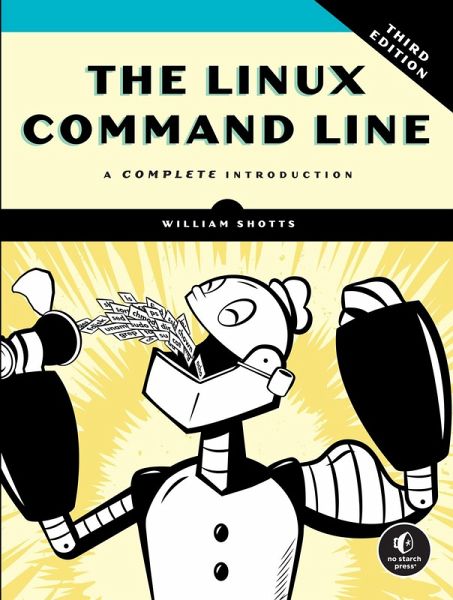
Banish Your Mouse. The Linux Command Line isn’t just a reference manual. It’s a complete education on how Linux really works. From your first tentative keystrokes to writing powerful shell scripts, you’ll build the confidence and understanding to make your system work for you. Now in its third edition, this best-selling guide has been fully updated with modern examples, nearly 40 pages of new content, and downloadable scripts from LinuxCommand. Used in more than a thousand classrooms and libraries worldwide, it has helped over 150,000 readers gain fluency and confidence in Linux. Author and…mehr
Banish Your Mouse. The Linux Command Line isn’t just a reference manual. It’s a complete education on how Linux really works. From your first tentative keystrokes to writing powerful shell scripts, you’ll build the confidence and understanding to make your system work for you. Now in its third edition, this best-selling guide has been fully updated with modern examples, nearly 40 pages of new content, and downloadable scripts from LinuxCommand. Used in more than a thousand classrooms and libraries worldwide, it has helped over 150,000 readers gain fluency and confidence in Linux. Author and command line guru William Shotts delivers not just commands, but genuine insight, guided by his philosophy: Make everything as simple as possible, but no simpler. Through short, digestible chapters, you’ll learn to: * Navigate the filesystem, manage files, and configure your environment * Chain commands, redirect input/output, and use regular expressions * Control processes, manage packages, and work with networking tools * Edit text with Vim * Write shell scripts to automate tasks and build custom tools * Use core utilities like grep, cut, sed, and tar to process data * Manage filesystems and compile programs from source Whether you’re managing servers, studying cybersecurity, or just curious about your computer, The Linux Command Line gives you the knowledge to command your system with confidence.
William Shotts has been a software professional for more than 40 years and a dedicated Linux user and advocate since 1996. Over his career, he’s worked as a programmer, teacher, photographer, and technical manager leading teams in customer support, software quality assurance, system administration, and documentation. He is also the creator of LinuxCommand, a long-running site that helps users master the Linux command line.
Inhaltsangabe
Acknowledgements Introduction Part I: Learning the Shell Chapter 1: What Is the Shell? Chapter 2: Navigation Chapter 3: Exploring the System Chapter 4: Manipulating Files and Directories Chapter 5: Working with Commands Chapter 6: Redirection Chapter 7: Seeing the World as the Shell Sees It Chapter 8: Advanced Keyboard Tricks Chapter 9: Permissions Chapter 10: Processes Part II: Configuration and the Environment Chapter 11: The Environment Chapter 12: A Gentle Introduction to vi(m) Chapter 13: Customizing the Prompt Part III: Common Tasks and Essential Tools Chapter 14: Package Management Chapter 15: Storage Media Chapter 16: Networking Chapter 17: Searching for Files Chapter 18: Archiving and Backup Chapter 19: Regular Expressions Chapter 20: Text Processing Chapter 21: Formatting Output Chapter 22: Printing Chapter 23: Compiling Programs Part IV: Writing Shell Scripts Chapter 24: Writing Your First Script Chapter 25: Starting a Project Chapter 26: Top-Down Design Chapter 27: Flow Control: Branching with if Chapter 28: Reading Keyboard Input Chapter 29: Flow Control: Looping with while/until Chapter 30: Troubleshooting Chapter 31: Flow Control: Branching with case Chapter 32: Positional Parameters Chapter 33: Flow Control: Looping with for Chapter 34: Strings and Numbers Chapter 35: Arrays Chapter 36: Exotica Index
Acknowledgements Introduction Part I: Learning the Shell Chapter 1: What Is the Shell? Chapter 2: Navigation Chapter 3: Exploring the System Chapter 4: Manipulating Files and Directories Chapter 5: Working with Commands Chapter 6: Redirection Chapter 7: Seeing the World as the Shell Sees It Chapter 8: Advanced Keyboard Tricks Chapter 9: Permissions Chapter 10: Processes Part II: Configuration and the Environment Chapter 11: The Environment Chapter 12: A Gentle Introduction to vi(m) Chapter 13: Customizing the Prompt Part III: Common Tasks and Essential Tools Chapter 14: Package Management Chapter 15: Storage Media Chapter 16: Networking Chapter 17: Searching for Files Chapter 18: Archiving and Backup Chapter 19: Regular Expressions Chapter 20: Text Processing Chapter 21: Formatting Output Chapter 22: Printing Chapter 23: Compiling Programs Part IV: Writing Shell Scripts Chapter 24: Writing Your First Script Chapter 25: Starting a Project Chapter 26: Top-Down Design Chapter 27: Flow Control: Branching with if Chapter 28: Reading Keyboard Input Chapter 29: Flow Control: Looping with while/until Chapter 30: Troubleshooting Chapter 31: Flow Control: Branching with case Chapter 32: Positional Parameters Chapter 33: Flow Control: Looping with for Chapter 34: Strings and Numbers Chapter 35: Arrays Chapter 36: Exotica Index
Es gelten unsere Allgemeinen Geschäftsbedingungen: www.buecher.de/agb
Impressum
www.buecher.de ist ein Internetauftritt der buecher.de internetstores GmbH
Geschäftsführung: Monica Sawhney | Roland Kölbl | Günter Hilger
Sitz der Gesellschaft: Batheyer Straße 115 - 117, 58099 Hagen
Postanschrift: Bürgermeister-Wegele-Str. 12, 86167 Augsburg
Amtsgericht Hagen HRB 13257
Steuernummer: 321/5800/1497
USt-IdNr: DE450055826